The following guide walks you through how to obtain an API key. If you already have your API key,
you can also explore practical examples and integration tips to jump start your journey with Chatsistant. Let’s begin!
Step 2: Create an Account (If you don’t already have one)
If you don’t have an account on the Chatsistant platform, click on the “Sign Up” or “Create Account”
button and follow the registration process. Provide the required information to create your account.
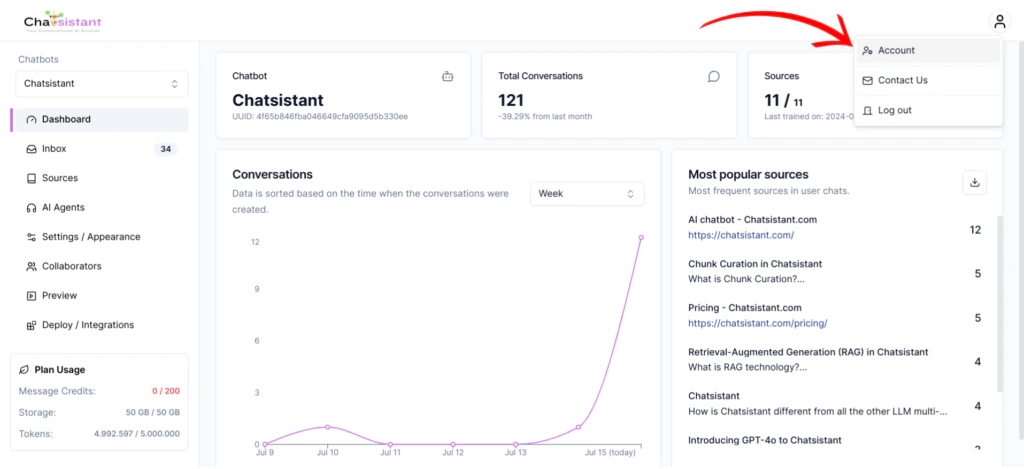
After successfully logging in, you’ll be directed to the app. Look for the “Account” menu in the platform’s
navigation bar. Click on it to access your account settings.
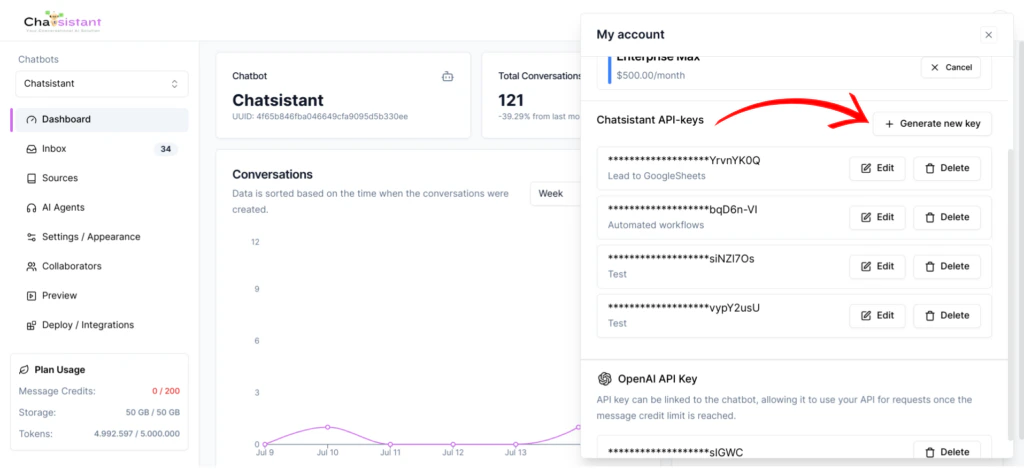
Inside your account settings, you will find an “API Keys” section. Within the API Keys section,
you should see an option to “Generate new key”. Click on it to initiate the process of creating a new API key.
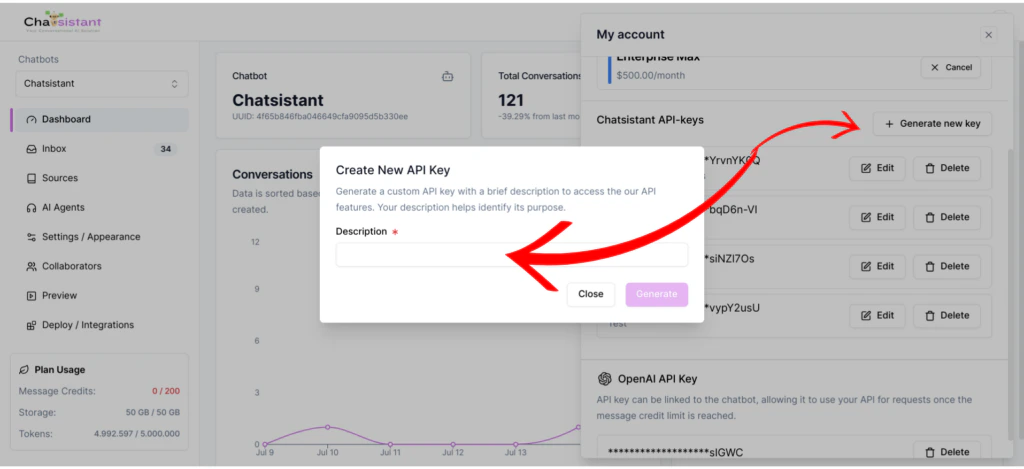
In the “Create New API Key” dialog, provide a description for your API key to help identify its purpose.
Once you’ve entered the description, click the “Generate” button to create your API key.
Be sure to copy and save your API key in a secure location. Do not share it
with anyone, as it provides access to the Chatsistant API services. Treat your
API key like a password.
Now, you’ve successfully requested, generated, and saved your Chatsistant API key.
You can use this key to authenticate your requests and integrate Chatsistant into your applications, scripts, or projects.If you’re ready to dive further and explore practical examples of using the Chatsistant API, please visit the “Live Examples” section on the left sidebar.
{"docsConfig":{"$schema":"https://mintlify.com/docs.json","theme":"mint","name":"Chatsistant API","colors":{"primary":"#2E3F51","light":"#516F90","dark":"#0D001D"},"favicon":"/logo/favicon.png","logo":{"light":"https://mintcdn.com/chatsistant/bw0W4PPFP0FNqFg-/logo/light.svg?fit=max\u0026auto=format\u0026n=bw0W4PPFP0FNqFg-\u0026q=85\u0026s=f721e4cc50453f170fe167c8d5f9971f","dark":"https://mintcdn.com/chatsistant/bw0W4PPFP0FNqFg-/logo/dark.svg?fit=max\u0026auto=format\u0026n=bw0W4PPFP0FNqFg-\u0026q=85\u0026s=fcd6fd05fd8afca74097b05fde4c4007","href":"https://chatsistant.com"},"api":{"mdx":{"server":"https://app.chatsistant.com/api","auth":{"method":"bearer","name":null}}},"background":{"decoration":null,"color":{"light":null,"dark":"#111827"}},"navbar":{"links":[{"label":"Support","href":"mailto:hello@chatsistant.com"}],"primary":null},"navigation":{"pages":[]}},"deployment":{"deploymentMetadataValue":{"subdomain":"chatsistant","hasAudioNarration":false,"actualSubdomain":"chatsistant","customDomains":["docs.chatsistant.com"],"gitSource":{"type":"github","owner":"chatsistant","repo":"docs","deployBranch":"main","contentDirectory":"","isPrivate":false,"mountPath":"","label":""},"chroma":{"liveDeploymentHistoryId":"6a21f6212af1650193592d35","collectionId":"ff68fb2a-91c7-4dc0-a6ff-701a8cd7a98c","schemaVersion":"v2"},"entitlements":{},"buildId":"6ae924d5124fa040b9a800d7:success","clientVersion":"0.0.4067","searchFilterCounts":[{"language":"default","tag":"API References","count":38},{"language":"default","tag":"Documentation","count":17},{"language":"default","tag":"Guides","count":14},{"language":"default","tag":"Data Sources","count":9},{"language":"default","tag":"Chatbots","count":6},{"language":"default","tag":"Agents","count":5},{"language":"default","tag":"Session Messages","count":5},{"language":"default","tag":"Chatbot Sessions","count":5},{"language":"default","tag":"API Usage Guides","count":4},{"language":"default","tag":"Data Source Tags","count":4}]},"assistantConfig":{},"basePath":"","hasChatPermissions":false,"hasWebMcpPermissions":false,"toggles":[{"name":"kill-isr","enabled":true,"variant":{"name":"disabled","enabled":false,"feature_enabled":true},"impressionData":false},{"name":"agent-mintlify-slack","enabled":true,"variant":{"name":"disabled","enabled":false,"feature_enabled":true},"impressionData":false},{"name":"agent-integrations-settings","enabled":true,"variant":{"name":"disabled","enabled":false,"feature_enabled":true},"impressionData":false},{"name":"rbac-expansion","enabled":true,"variant":{"name":"disabled","enabled":false,"feature_enabled":true},"impressionData":false},{"name":"automations-pr-grouping","enabled":true,"variant":{"name":"disabled","enabled":false,"feature_enabled":true},"impressionData":false},{"name":"custom-prefix","enabled":true,"variant":{"name":"disabled","enabled":false,"feature_enabled":true},"impressionData":false},{"name":"analytics-v7","enabled":true,"variant":{"name":"disabled","enabled":false,"feature_enabled":true},"impressionData":false},{"name":"user-flows-analytics","enabled":true,"variant":{"name":"disabled","enabled":false,"feature_enabled":true},"impressionData":false},{"name":"no-publish-flow","enabled":true,"variant":{"name":"disabled","enabled":false,"feature_enabled":true},"impressionData":false},{"name":"workos-onboarding","enabled":true,"variant":{"name":"disabled","enabled":false,"feature_enabled":true},"impressionData":false},{"name":"llms-txt-v2","enabled":true,"variant":{"name":"disabled","enabled":false,"feature_enabled":true},"impressionData":false},{"name":"snapshot-serving-live","enabled":true,"variant":{"name":"disabled","enabled":false,"feature_enabled":true},"impressionData":false},{"name":"stripTemperatureMiddleware","enabled":true,"variant":{"name":"disabled","enabled":false,"feature_enabled":true},"impressionData":false},{"name":"support-platform-pylon-zendesk","enabled":true,"variant":{"name":"disabled","enabled":false,"feature_enabled":true},"impressionData":false},{"name":"snapshot-serving","enabled":true,"variant":{"name":"disabled","enabled":false,"feature_enabled":true},"impressionData":false},{"name":"instant-rollback","enabled":true,"variant":{"name":"disabled","enabled":false,"feature_enabled":true},"impressionData":false},{"name":"granular-notifications-server","enabled":true,"variant":{"name":"disabled","enabled":false,"feature_enabled":true},"impressionData":false},{"name":"granular-notifications","enabled":true,"variant":{"name":"disabled","enabled":false,"feature_enabled":true},"impressionData":false},{"name":"automations-fable","enabled":true,"variant":{"name":"disabled","enabled":false,"feature_enabled":true},"impressionData":false},{"name":"fixed-ai-action-pricing","enabled":true,"variant":{"name":"disabled","enabled":false,"feature_enabled":true},"impressionData":false},{"name":"automation-resolve-merge-conflict","enabled":true,"variant":{"name":"disabled","enabled":false,"feature_enabled":true},"impressionData":false},{"name":"scoped-publishing","enabled":true,"variant":{"name":"disabled","enabled":false,"feature_enabled":true},"impressionData":false},{"name":"mintql","enabled":true,"variant":{"name":"disabled","enabled":false,"feature_enabled":true},"impressionData":false},{"name":"page-level-analytics","enabled":true,"variant":{"name":"disabled","enabled":false,"feature_enabled":true},"impressionData":false},{"name":"editor-version-history-v2","enabled":true,"variant":{"name":"disabled","enabled":false,"feature_enabled":true},"impressionData":false},{"name":"billing-page-v2","enabled":true,"variant":{"name":"disabled","enabled":false,"feature_enabled":true},"impressionData":false},{"name":"full-page-search","enabled":true,"variant":{"name":"disabled","enabled":false,"feature_enabled":true},"impressionData":false},{"name":"workspace-projects","enabled":true,"variant":{"name":"disabled","enabled":false,"feature_enabled":true},"impressionData":false},{"name":"assistant-v5","enabled":true,"variant":{"name":"disabled","enabled":false,"feature_enabled":true},"impressionData":false},{"name":"fork-pr-previews","enabled":true,"variant":{"name":"disabled","enabled":false,"feature_enabled":true},"impressionData":false},{"name":"revalidation-jwt","enabled":true,"variant":{"name":"disabled","enabled":false,"feature_enabled":true},"impressionData":false},{"name":"vite-origin","enabled":true,"variant":{"name":"disabled","enabled":false,"feature_enabled":true},"impressionData":false},{"name":"workos-sso-scim","enabled":true,"variant":{"name":"disabled","enabled":false,"feature_enabled":true},"impressionData":false},{"name":"hobby-abuse-scan","enabled":true,"variant":{"name":"disabled","enabled":false,"feature_enabled":true},"impressionData":false},{"name":"dashboard-inbox","enabled":true,"variant":{"name":"disabled","enabled":false,"feature_enabled":true},"impressionData":false},{"name":"workos-signup","enabled":true,"variant":{"name":"disabled","enabled":false,"feature_enabled":true},"impressionData":false},{"name":"turbopuffer-dual-write","enabled":true,"variant":{"name":"disabled","enabled":false,"feature_enabled":true},"impressionData":false},{"name":"workos-enabled","enabled":true,"variant":{"name":"disabled","enabled":false,"feature_enabled":true},"impressionData":false},{"name":"approve-review-flow","enabled":true,"variant":{"name":"disabled","enabled":false,"feature_enabled":true},"impressionData":false},{"name":"sso-setup-deadline-banner","enabled":true,"variant":{"name":"disabled","enabled":false,"feature_enabled":true},"impressionData":false},{"name":"turbopuffer-serve","enabled":true,"variant":{"name":"disabled","enabled":false,"feature_enabled":true},"impressionData":false}],"googleFontsInlined":false},"customCss":[],"page":{"pagePath":"api-reference/api-key-setup","slug":"/api-reference/api-key-setup","pageMetadata":{"title":"Getting a Chatsistant API Key","description":null,"href":"/api-reference/api-key-setup"},"pageType":"default","mdx":{"mdxSource":{"compiledSource":"\"use strict\";const{Fragment:_Fragment,jsx:_jsx,jsxs:_jsxs}=arguments[0];const{useMDXComponents:_provideComponents}=arguments[0];function _createMdxContent(props){const _components={a:`a`,p:`p`,strong:`strong`,..._provideComponents(),...props.components},{Frame,Heading,OptimizedImage,Warning}=_components;if(!Frame)_missingMdxReference(`Frame`,true);if(!Heading)_missingMdxReference(`Heading`,true);if(!OptimizedImage)_missingMdxReference(`OptimizedImage`,true);if(!Warning)_missingMdxReference(`Warning`,true);return _jsxs(_Fragment,{children:[_jsx(_components.p,{children:`The following guide walks you through how to obtain an API key. If you already have your API key,\nyou can also explore practical examples and integration tips to jump start your journey with Chatsistant. Let’s begin!`}),`\n`,_jsx(Heading,{level:`2`,id:`step-1-access-chatsistant-platform`,children:`Step 1: Access Chatsistant Platform`}),`\n`,_jsxs(_components.p,{children:[`Go to the `,_jsx(_components.a,{href:`https://app.chatsistant.com`,children:`Chatsistant platform`}),`.`]}),`\n`,_jsx(Heading,{level:`2`,id:`step-2-create-an-account-if-you-don’t-already-have-one`,children:`Step 2: Create an Account (If you don’t already have one)`}),`\n`,_jsx(_components.p,{children:`If you don’t have an account on the Chatsistant platform, click on the “Sign Up” or “Create Account”\nbutton and follow the registration process. Provide the required information to create your account.`}),`\n`,_jsx(Heading,{level:`2`,id:`step-3-access-your-account-menu`,children:`Step 3: Access Your Account Menu`}),`\n`,_jsx(_components.p,{children:`After successfully logging in, you’ll be directed to the app. Look for the “Account” menu in the platform’s\nnavigation bar. Click on it to access your account settings.`}),`\n`,_jsx(Frame,{children:_jsx(OptimizedImage,{src:`https://mintcdn.com/chatsistant/_PfgpPLIz_t18KMO/images/api-key-1.png?fit=max\u0026auto=format\u0026n=_PfgpPLIz_t18KMO\u0026q=85\u0026s=c9a05a66ccb9e2ae460dd54554223c62`,\"data-og-width\":`1024`,width:`1024`,\"data-og-height\":`469`,height:`469`,\"data-path\":`images/api-key-1.png`,\"data-optimize\":`true`,\"data-opv\":`3`,srcset:`https://mintcdn.com/chatsistant/_PfgpPLIz_t18KMO/images/api-key-1.png?w=280\u0026fit=max\u0026auto=format\u0026n=_PfgpPLIz_t18KMO\u0026q=85\u0026s=56bec8fb1cf8be8ee8c28edf44c7d383 280w, https://mintcdn.com/chatsistant/_PfgpPLIz_t18KMO/images/api-key-1.png?w=560\u0026fit=max\u0026auto=format\u0026n=_PfgpPLIz_t18KMO\u0026q=85\u0026s=5c1029aea52a52200f0dd34479c7bb5f 560w, https://mintcdn.com/chatsistant/_PfgpPLIz_t18KMO/images/api-key-1.png?w=840\u0026fit=max\u0026auto=format\u0026n=_PfgpPLIz_t18KMO\u0026q=85\u0026s=9eed213732b04d54df58da38bf852a49 840w, https://mintcdn.com/chatsistant/_PfgpPLIz_t18KMO/images/api-key-1.png?w=1100\u0026fit=max\u0026auto=format\u0026n=_PfgpPLIz_t18KMO\u0026q=85\u0026s=dfeed5a4ed32cc5ce4a5535ed947ec51 1100w, https://mintcdn.com/chatsistant/_PfgpPLIz_t18KMO/images/api-key-1.png?w=1650\u0026fit=max\u0026auto=format\u0026n=_PfgpPLIz_t18KMO\u0026q=85\u0026s=602c0007f7ec956795de0447724fb843 1650w, https://mintcdn.com/chatsistant/_PfgpPLIz_t18KMO/images/api-key-1.png?w=2500\u0026fit=max\u0026auto=format\u0026n=_PfgpPLIz_t18KMO\u0026q=85\u0026s=7c8a0232f24e9881c5b8c4a5915a110d 2500w`})}),`\n`,_jsx(Heading,{level:`2`,id:`step-4-navigate-to-api-keys-section`,children:`Step 4: Navigate to API Keys Section`}),`\n`,_jsx(_components.p,{children:`Inside your account settings, you will find an “API Keys” section. Within the API Keys section,\nyou should see an option to “Generate new key”. Click on it to initiate the process of creating a new API key.`}),`\n`,_jsx(Frame,{children:_jsx(OptimizedImage,{src:`https://mintcdn.com/chatsistant/_PfgpPLIz_t18KMO/images/api-key-2.png?fit=max\u0026auto=format\u0026n=_PfgpPLIz_t18KMO\u0026q=85\u0026s=5eaf0ad5a5dae1b3ab431190cd853ef7`,\"data-og-width\":`1024`,width:`1024`,\"data-og-height\":`469`,height:`469`,\"data-path\":`images/api-key-2.png`,\"data-optimize\":`true`,\"data-opv\":`3`,srcset:`https://mintcdn.com/chatsistant/_PfgpPLIz_t18KMO/images/api-key-2.png?w=280\u0026fit=max\u0026auto=format\u0026n=_PfgpPLIz_t18KMO\u0026q=85\u0026s=c1cf3374035fc9c2f475a0690b0aa64e 280w, https://mintcdn.com/chatsistant/_PfgpPLIz_t18KMO/images/api-key-2.png?w=560\u0026fit=max\u0026auto=format\u0026n=_PfgpPLIz_t18KMO\u0026q=85\u0026s=9f9eb0f59af58cd45ef415b1e54ca85c 560w, https://mintcdn.com/chatsistant/_PfgpPLIz_t18KMO/images/api-key-2.png?w=840\u0026fit=max\u0026auto=format\u0026n=_PfgpPLIz_t18KMO\u0026q=85\u0026s=998725a7a3892e53a9318d4189910a29 840w, https://mintcdn.com/chatsistant/_PfgpPLIz_t18KMO/images/api-key-2.png?w=1100\u0026fit=max\u0026auto=format\u0026n=_PfgpPLIz_t18KMO\u0026q=85\u0026s=261f4f7fec5f6240e2eff07d37736819 1100w, https://mintcdn.com/chatsistant/_PfgpPLIz_t18KMO/images/api-key-2.png?w=1650\u0026fit=max\u0026auto=format\u0026n=_PfgpPLIz_t18KMO\u0026q=85\u0026s=8e3ddaa756a215cdf8ebaf88ac69127e 1650w, https://mintcdn.com/chatsistant/_PfgpPLIz_t18KMO/images/api-key-2.png?w=2500\u0026fit=max\u0026auto=format\u0026n=_PfgpPLIz_t18KMO\u0026q=85\u0026s=fa38d9b5e9ab9ed44a10ebe6495326bc 2500w`})}),`\n`,_jsx(Heading,{level:`2`,id:`step-5-enter-key-description-and-generate`,children:`Step 5: Enter Key Description and Generate`}),`\n`,_jsx(_components.p,{children:`In the “Create New API Key” dialog, provide a description for your API key to help identify its purpose.\nOnce you’ve entered the description, click the “Generate” button to create your API key.`}),`\n`,_jsx(Warning,{children:_jsx(_components.p,{children:`Be sure to copy and save your API key in a secure location. Do not share it\nwith anyone, as it provides access to the Chatsistant API services. Treat your\nAPI key like a password.`})}),`\n`,_jsx(Frame,{children:_jsx(OptimizedImage,{src:`https://mintcdn.com/chatsistant/_PfgpPLIz_t18KMO/images/api-key-3.png?fit=max\u0026auto=format\u0026n=_PfgpPLIz_t18KMO\u0026q=85\u0026s=fcc0a3104607b5ab15d8f36a3e2d192c`,\"data-og-width\":`1024`,width:`1024`,\"data-og-height\":`469`,height:`469`,\"data-path\":`images/api-key-3.png`,\"data-optimize\":`true`,\"data-opv\":`3`,srcset:`https://mintcdn.com/chatsistant/_PfgpPLIz_t18KMO/images/api-key-3.png?w=280\u0026fit=max\u0026auto=format\u0026n=_PfgpPLIz_t18KMO\u0026q=85\u0026s=96468c9d5570924f68379f249a5561f2 280w, https://mintcdn.com/chatsistant/_PfgpPLIz_t18KMO/images/api-key-3.png?w=560\u0026fit=max\u0026auto=format\u0026n=_PfgpPLIz_t18KMO\u0026q=85\u0026s=1973df6b39174daefc54fa363509b24e 560w, https://mintcdn.com/chatsistant/_PfgpPLIz_t18KMO/images/api-key-3.png?w=840\u0026fit=max\u0026auto=format\u0026n=_PfgpPLIz_t18KMO\u0026q=85\u0026s=67c3f7ac82dc6c952153aadc3004f79d 840w, https://mintcdn.com/chatsistant/_PfgpPLIz_t18KMO/images/api-key-3.png?w=1100\u0026fit=max\u0026auto=format\u0026n=_PfgpPLIz_t18KMO\u0026q=85\u0026s=93838102a43261cef500314ab4049280 1100w, https://mintcdn.com/chatsistant/_PfgpPLIz_t18KMO/images/api-key-3.png?w=1650\u0026fit=max\u0026auto=format\u0026n=_PfgpPLIz_t18KMO\u0026q=85\u0026s=88265151a9e93c79e2926cceee857f6e 1650w, https://mintcdn.com/chatsistant/_PfgpPLIz_t18KMO/images/api-key-3.png?w=2500\u0026fit=max\u0026auto=format\u0026n=_PfgpPLIz_t18KMO\u0026q=85\u0026s=b7c456b77f11f1b6f19e89ed7da81e28 2500w`})}),`\n`,_jsx(_components.p,{children:`Now, you’ve successfully requested, generated, and saved your Chatsistant API key.\nYou can use this key to authenticate your requests and integrate Chatsistant into your applications, scripts, or projects.`}),`\n`,_jsxs(_components.p,{children:[`If you’re ready to dive further and explore practical examples of using the Chatsistant API, please visit the `,_jsx(_components.strong,{children:`“Live Examples”`}),` section on the left sidebar.`]})]})}function MDXContent(props={}){const{wrapper:MDXLayout}={..._provideComponents(),...props.components};return MDXLayout?_jsx(MDXLayout,{...props,children:_jsx(_createMdxContent,{...props})}):_createMdxContent(props)}return{default:MDXContent};function _missingMdxReference(id,component){throw new Error(`Expected `+(component?`component`:`object`)+\" `\"+id+\"` to be defined: you likely forgot to import, pass, or provide it.\")}","frontmatter":{},"scope":{"config":{},"pageMetadata":{"title":"Getting a Chatsistant API Key","description":null,"href":"/api-reference/api-key-setup"}}},"mdxSourceWithNoJs":null},"mdxExtracts":{"tableOfContents":[{"title":"Step 1: Access Chatsistant Platform","slug":"step-1-access-chatsistant-platform","depth":2,"children":[]},{"title":"Step 2: Create an Account (If you don’t already have one)","slug":"step-2-create-an-account-if-you-don’t-already-have-one","depth":2,"children":[]},{"title":"Step 3: Access Your Account Menu","slug":"step-3-access-your-account-menu","depth":2,"children":[]},{"title":"Step 4: Navigate to API Keys Section","slug":"step-4-navigate-to-api-keys-section","depth":2,"children":[]},{"title":"Step 5: Enter Key Description and Generate","slug":"step-5-enter-key-description-and-generate","depth":2,"children":[]}],"codeExamples":{}},"jsLinks":[],"subdomain":"chatsistant","siteName":"Chatsistant API","title":"Getting a Chatsistant API Key - Chatsistant API","navMaps":{"firstHrefInVersion":{},"firstHrefInLanguage":{}},"lastModified":"2026-01-07T05:56:51.247Z","originalFileLocation":"api-reference/api-key-setup.mdx"},"headHtml":"\u003cscript data-mint-head>(function(){var d=document.documentElement,p=null;if(!p){try{p=localStorage.getItem(\"isDarkMode\")}catch(e){}if(p==='true')p='dark';else if(p==='false')p='light';if(p!=='light'\u0026\u0026p!=='dark'\u0026\u0026p!=='system')p=\"system\"}var r=p==='system'?(matchMedia(\"(prefers-color-scheme: dark)\").matches?'dark':'light'):p;d.classList.remove(r==='dark'?'light':'dark');d.classList.add(r);d.setAttribute(\"data-theme-preference\",p)})();\u003c/script>\u003cmeta data-mint-head name=\"application-name\" content=\"Chatsistant API\">\u003cmeta data-mint-head name=\"generator\" content=\"Mintlify\">\u003clink data-mint-head rel=\"icon\" type=\"image/png\" sizes=\"192x192\" href=\"/mintlify-assets/_mintlify/favicons/chatsistant/jsSqGek8HR7LeVmL/_generated/favicon/android-chrome-192x192.png\" media=\"(prefers-color-scheme: light)\">\u003clink data-mint-head rel=\"apple-touch-icon\" type=\"image/png\" sizes=\"180x180\" href=\"/mintlify-assets/_mintlify/favicons/chatsistant/jsSqGek8HR7LeVmL/_generated/favicon/apple-touch-icon.png\">\u003clink data-mint-head rel=\"icon\" type=\"image/png\" sizes=\"16x16\" href=\"/mintlify-assets/_mintlify/favicons/chatsistant/jsSqGek8HR7LeVmL/_generated/favicon/favicon-16x16.png\" media=\"(prefers-color-scheme: light)\">\u003clink data-mint-head rel=\"icon\" type=\"image/png\" sizes=\"32x32\" href=\"/mintlify-assets/_mintlify/favicons/chatsistant/jsSqGek8HR7LeVmL/_generated/favicon/favicon-32x32.png\" media=\"(prefers-color-scheme: light)\">\u003clink data-mint-head rel=\"shortcut icon\" type=\"image/x-icon\" href=\"/mintlify-assets/_mintlify/favicons/chatsistant/jsSqGek8HR7LeVmL/_generated/favicon/favicon.ico\" media=\"(prefers-color-scheme: light)\">\u003clink data-mint-head rel=\"icon\" type=\"image/png\" sizes=\"192x192\" href=\"/mintlify-assets/_mintlify/favicons/chatsistant/jsSqGek8HR7LeVmL/_generated/favicon-dark/android-chrome-192x192.png\" media=\"(prefers-color-scheme: dark)\">\u003clink data-mint-head rel=\"icon\" type=\"image/png\" sizes=\"16x16\" href=\"/mintlify-assets/_mintlify/favicons/chatsistant/jsSqGek8HR7LeVmL/_generated/favicon-dark/favicon-16x16.png\" media=\"(prefers-color-scheme: dark)\">\u003clink data-mint-head rel=\"icon\" type=\"image/png\" sizes=\"32x32\" href=\"/mintlify-assets/_mintlify/favicons/chatsistant/jsSqGek8HR7LeVmL/_generated/favicon-dark/favicon-32x32.png\" media=\"(prefers-color-scheme: dark)\">\u003clink data-mint-head rel=\"shortcut icon\" type=\"image/x-icon\" href=\"/mintlify-assets/_mintlify/favicons/chatsistant/jsSqGek8HR7LeVmL/_generated/favicon-dark/favicon.ico\" media=\"(prefers-color-scheme: dark)\">\u003cmeta data-mint-head property=\"og:title\" content=\"Getting a Chatsistant API Key - Chatsistant API\">\u003cmeta data-mint-head property=\"og:site_name\" content=\"Chatsistant API\">\u003cmeta data-mint-head property=\"og:url\" content=\"https://docs.chatsistant.com/api-reference/api-key-setup\">\u003cmeta data-mint-head property=\"og:type\" content=\"website\">\u003cmeta data-mint-head property=\"og:image\" content=\"https://chatsistant.mintlify.app/_mintlify/api/og/v2?division=API+Usage+Guides\u0026amp;title=Getting+a+Chatsistant+API+Key\u0026amp;theme=d7f2b54eec0e3933ad58bfa6\u0026amp;signature=1bd03f2a1d685f50b6fb880dd20035b0a6d02cc714d382cd5f60bb0e2d44f3b4\">\u003cmeta data-mint-head property=\"og:image:width\" content=\"1200\">\u003cmeta data-mint-head property=\"og:image:height\" content=\"630\">\u003cmeta data-mint-head name=\"twitter:card\" content=\"summary_large_image\">\u003cmeta data-mint-head name=\"twitter:title\" content=\"Getting a Chatsistant API Key - Chatsistant API\">\u003cmeta data-mint-head name=\"twitter:image\" content=\"https://chatsistant.mintlify.app/_mintlify/api/og/v2?division=API+Usage+Guides\u0026amp;title=Getting+a+Chatsistant+API+Key\u0026amp;theme=d7f2b54eec0e3933ad58bfa6\u0026amp;signature=1bd03f2a1d685f50b6fb880dd20035b0a6d02cc714d382cd5f60bb0e2d44f3b4\">\u003cmeta data-mint-head name=\"twitter:image:width\" content=\"1200\">\u003cmeta data-mint-head name=\"twitter:image:height\" content=\"630\">\u003cmeta data-mint-head name=\"msapplication-config\" content=\"/mintlify-assets/_mintlify/favicons/chatsistant/jsSqGek8HR7LeVmL/_generated/favicon/browserconfig.xml\">\u003cmeta data-mint-head name=\"apple-mobile-web-app-title\" content=\"Chatsistant API\">\u003cmeta data-mint-head name=\"msapplication-TileColor\" content=\"#2E3F51\">\u003clink data-mint-head rel=\"canonical\" href=\"https://docs.chatsistant.com/api-reference/api-key-setup\">\u003clink data-mint-head rel=\"alternate\" type=\"application/xml\" href=\"/sitemap.xml\">\u003clink data-mint-head rel=\"alternate\" type=\"text/markdown\" href=\"/api-reference/api-key-setup.md\">\u003cscript data-mint-head type=\"application/ld+json\">{\"@context\":\"https://schema.org\",\"@graph\":[{\"@type\":\"Organization\",\"@id\":\"https://docs.chatsistant.com/#organization\",\"name\":\"Chatsistant API\",\"url\":\"https://docs.chatsistant.com\",\"logo\":{\"@type\":\"ImageObject\",\"url\":\"https://mintcdn.com/chatsistant/bw0W4PPFP0FNqFg-/logo/light.svg?fit=max\u0026auto=format\u0026n=bw0W4PPFP0FNqFg-\u0026q=85\u0026s=f721e4cc50453f170fe167c8d5f9971f\"}},{\"@type\":\"WebSite\",\"@id\":\"https://docs.chatsistant.com#website\",\"name\":\"Chatsistant API\",\"url\":\"https://docs.chatsistant.com\",\"publisher\":{\"@id\":\"https://docs.chatsistant.com/#organization\"}},{\"@type\":\"WebPage\",\"@id\":\"https://docs.chatsistant.com/api-reference/api-key-setup#webpage\",\"url\":\"https://docs.chatsistant.com/api-reference/api-key-setup\",\"name\":\"Getting a Chatsistant API Key\",\"dateModified\":\"2026-01-07T05:56:51.247Z\",\"isPartOf\":{\"@id\":\"https://docs.chatsistant.com#website\"},\"breadcrumb\":{\"@id\":\"https://docs.chatsistant.com/api-reference/api-key-setup#breadcrumb\"}},{\"@type\":\"BreadcrumbList\",\"@id\":\"https://docs.chatsistant.com/api-reference/api-key-setup#breadcrumb\",\"itemListElement\":[{\"@type\":\"ListItem\",\"position\":1,\"name\":\"Chatsistant API\",\"item\":\"https://docs.chatsistant.com\"},{\"@type\":\"ListItem\",\"position\":2,\"name\":\"Getting a Chatsistant API Key\",\"item\":\"https://docs.chatsistant.com/api-reference/api-key-setup\"}]},{\"@type\":[\"Article\",\"TechArticle\"],\"@id\":\"https://docs.chatsistant.com/api-reference/api-key-setup#article\",\"headline\":\"Getting a Chatsistant API Key\",\"name\":\"Getting a Chatsistant API Key\",\"url\":\"https://docs.chatsistant.com/api-reference/api-key-setup\",\"mainEntityOfPage\":{\"@id\":\"https://docs.chatsistant.com/api-reference/api-key-setup#webpage\"},\"dateModified\":\"2026-01-07T05:56:51.247Z\",\"publisher\":{\"@id\":\"https://docs.chatsistant.com/#organization\"},\"isPartOf\":{\"@id\":\"https://docs.chatsistant.com#website\"}}]}\u003c/script>\u003cscript data-mint-head type=\"application/ld+json\">{\"@context\":\"https://schema.org\",\"@type\":\"WebSite\",\"name\":\"Chatsistant API\",\"creator\":{\"@type\":\"Organization\",\"name\":\"Mintlify\",\"url\":\"https://mintlify.com\"}}\u003c/script>","siteName":"Chatsistant API","nav":{"global":null,"anchors":[{"anchor":"Documentation","icon":"book-open","pages":[{"title":"Documentation","href":"/introduction"}]},{"anchor":"API References","icon":"code","groups":[{"group":"API Usage Guides","pages":[{"title":"Getting a Chatsistant API Key","href":"/api-reference/api-key-setup"},{"title":"Create Chatbot","description":null,"href":"/api-reference/guide-00-chatbot-create"},{"title":"Chat with Chatbot","href":"/api-reference/guide-01-chat"},{"title":"Uploading Data Sources","href":"/api-reference/guide-02-source"}]},{"group":"Chatbots","pages":[{"title":"Chatbot Properties","href":"/api-reference/chatbots/properties-reference"},{"title":"Create Chatbot","api":"POST https://app.chatsistant.com/api/v1/chatbot/create","href":"/api-reference/chatbots/create"},{"title":"Update Chatbot","api":"POST https://app.chatsistant.com/api/v1/chatbot/{uuid}/update","href":"/api-reference/chatbots/update"},{"title":"Fetch a Chatbot","api":"GET https://app.chatsistant.com/api/v1/chatbot/{uuid}","href":"/api-reference/chatbots/fetch"},{"title":"Fetch all Chatbots","api":"GET https://app.chatsistant.com/api/v1/chatbots","href":"/api-reference/chatbots/fetch_multi"},{"title":"Delete Chatbot","api":"DELETE https://app.chatsistant.com/api/v1/chatbot/{uuid}/delete","href":"/api-reference/chatbots/delete"}]},{"group":"Agents","pages":[{"title":"Agent Properties","href":"/api-reference/agents/properties-reference"},{"title":"Create Agent","api":"POST https://app.chatsistant.com/api/v1/chatbot/\u003cuuid>/agent/create","href":"/api-reference/agents/create"},{"title":"Update Agent","api":"POST https://app.chatsistant.com/api/v1/agent/{uuid}/update","href":"/api-reference/agents/update"},{"title":"Fetch all Agents","api":"GET https://app.chatsistant.com/api/v1/chatbot/{uuid}/agents","href":"/api-reference/agents/fetch_multi"},{"title":"Delete Agent","api":"DELETE https://app.chatsistant.com/api/v1/agent/{uuid}/delete","href":"/api-reference/agents/delete"}]},{"group":"Chatbot Sessions","pages":[{"title":"Session Properties","href":"/api-reference/sessions/properties-reference"},{"title":"Create Session","api":"POST https://app.chatsistant.com/api/v1/chatbot/{uuid}/session/create","href":"/api-reference/sessions/create"},{"title":"Fetch a Session","api":"GET https://app.chatsistant.com/api/v1/session/{uuid}","href":"/api-reference/sessions/fetch"},{"title":"Fetch all Sessions","api":"GET https://app.chatsistant.com/api/v1/chatbot/{uuid}/sessions","href":"/api-reference/sessions/fetch_multi"},{"title":"Delete Session","api":"POST https://app.chatsistant.com/api/v1/session/{uuid}/delete","href":"/api-reference/sessions/delete"}]},{"group":"Session Messages","pages":[{"title":"Message Properties","href":"/api-reference/messages/properties-reference"},{"title":"Create Message","api":"POST https://app.chatsistant.com/api/v1/session/{uuid}/message/stream","href":"/api-reference/messages/create"},{"title":"Fetch all Messages","api":"GET https://app.chatsistant.com/api/v1/session/{uuid}/messages","href":"/api-reference/messages/fetch_multi"},{"title":"Delete Message","api":"POST https://app.chatsistant.com/api/v1/message/{uuid}/delete","href":"/api-reference/messages/delete"},{"title":"Delete multiple Messages","api":"POST https://app.chatsistant.com/api/v1/messages/delete","href":"/api-reference/messages/delete_multi"}]},{"group":"Data Sources","pages":[{"title":"Source properties","href":"/api-reference/data-sources/properties-reference"},{"title":"Upload a File","api":"POST https://app.chatsistant.com/api/v1/chatbot/{uuid}/data-source/upload","href":"/api-reference/data-sources/create-file"},{"title":"Create QA Source","api":"POST https://app.chatsistant.com/api/v1/chatbot/{uuid}/data-source/qa","href":"/api-reference/data-sources/create-qa"},{"title":"Create URL Source","api":"POST https://app.chatsistant.com/api/v1/chatbot/{uuid}/data-source/url","href":"/api-reference/data-sources/create-url"},{"title":"Update Source","api":"POST https://app.chatsistant.com/api/v1/data-source/{uuid}/update","href":"/api-reference/data-sources/update"},{"title":"Fetch list of Sources","api":"GET https://app.chatsistant.com/api/v1/chatbot/{uuid}/data-sources","href":"/api-reference/data-sources/fetch_multi"},{"title":"Retrain Sources","api":"POST https://app.chatsistant.com/api/v1/data-sources/url/re-scrape","href":"/api-reference/data-sources/retrain"},{"title":"Delete Source","api":"POST https://app.chatsistant.com/api/v1/data-source/{uuid}/delete","href":"/api-reference/data-sources/delete"},{"title":"Delete multiple Sources","api":"POST https://app.chatsistant.com/api/v1/data-sources/delete","href":"/api-reference/data-sources/delete_multi"}]},{"group":"Data Source Tags","pages":[{"title":"Create Source Tag","api":"POST https://app.chatsistant.com/api/v1/chatbot/\u003cuuid>/source-tag/create","href":"/api-reference/source-tags/create"},{"title":"Fetch all Source Tags","api":"GET https://app.chatsistant.com/api/v1/chatbot/\u003cuuid>/source-tags","href":"/api-reference/source-tags/fetch-multi"},{"title":"Update Source Tag","api":"POST https://app.chatsistant.com/api/v1/source-tag/\u003cuuid>/update","href":"/api-reference/source-tags/update"},{"title":"Delete Source Tag","api":"DELETE https://app.chatsistant.com/api/v1/source-tag/{uuid}/delete","href":"/api-reference/source-tags/delete"}]}]}]},"basePath":"","title":"Getting a Chatsistant API Key - Chatsistant API","buildId":"dpl_9VVk5y1P8k1ATeJguVngy9Q3cmbD","deploymentId":"dpl_9VVk5y1P8k1ATeJguVngy9Q3cmbD","dynamics":["07c022d89b","a74be98ba7"],"chunks":["Frame-BdiBGm0H.js","DynamicMarkdown-CbqEDjbV.js","zoom-image-lightbox-CvtNkYOX.js","lightbox-handle-r17bVUz3.js"]}